Prestarts · Timesheets · Take 5 · JHA · Incidents

The paperwork,
done from the cab

One Team puts your prestart book, timesheets and safety forms on the phone your crew already carries. Built in Western Australia for mining and civil crews.

$99every 4 weeks, whole crew
4 weeksfree trial, no card
0 barsworks with no reception
A prestart being filled in on a phone in One Team

See it in a minute

A minute on what the paperwork actually costs you out there — and what it looks like when the whole lot lives on the phone already in your pocket.

Or the role-by-role walkthrough — every tab, with the actual screens your crew will be working in.

Every part of it

Fourteen screens, the whole shift. These are real screens from the app, filled with an example crew — not mock-ups.

01 / 14

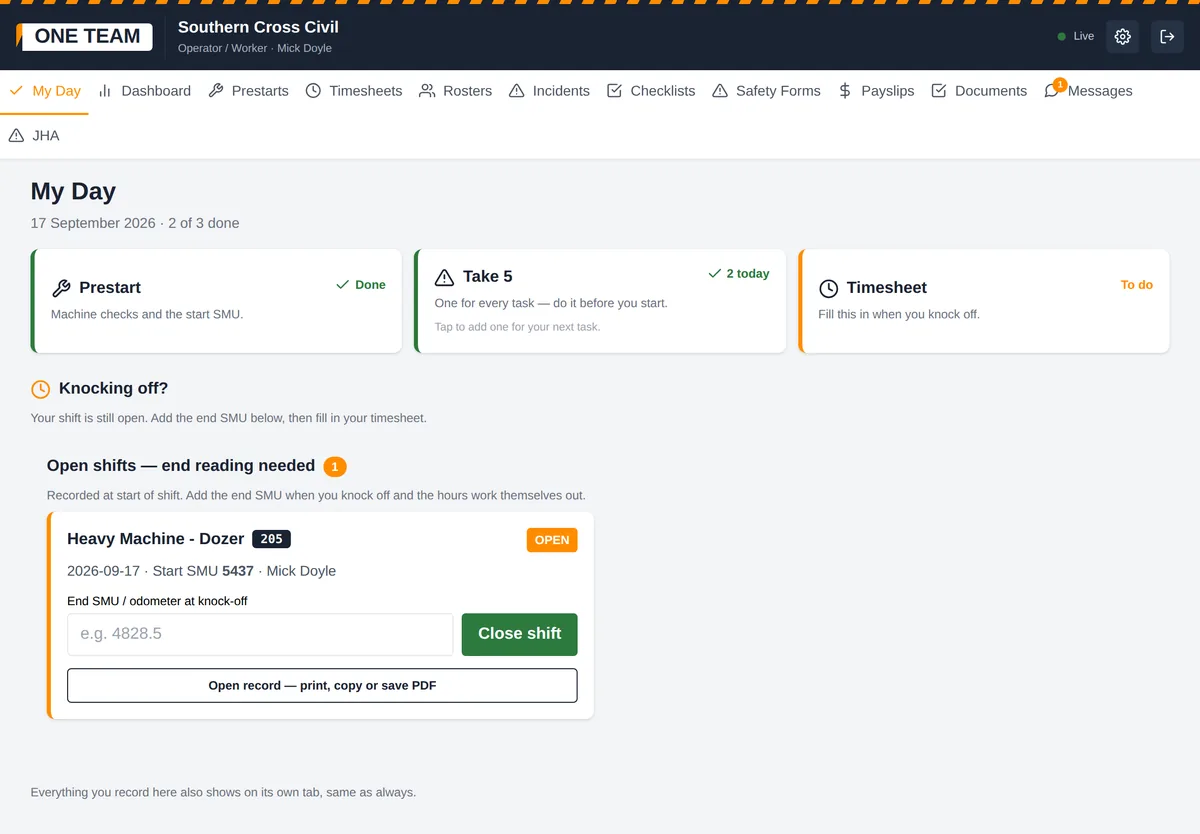
My Day

One tab, one shift

The three things an operator fills in every shift, in one place, with what is still outstanding on the front of it — prestart, Take 5, timesheet. Take 5 counts up rather than ticking off, because it is one for every task and not one a day. Each step saves the moment it is done, so a bloke called away after his prestart still has his prestart. And while the shift is open the tab asks for the end SMU at knock-off instead of waiting to be found. Everything still lands on its own tab for the office.

Operators, supervisors, managers
The My Day screen in One Team

02 / 14

Dashboard

The shift at a glance

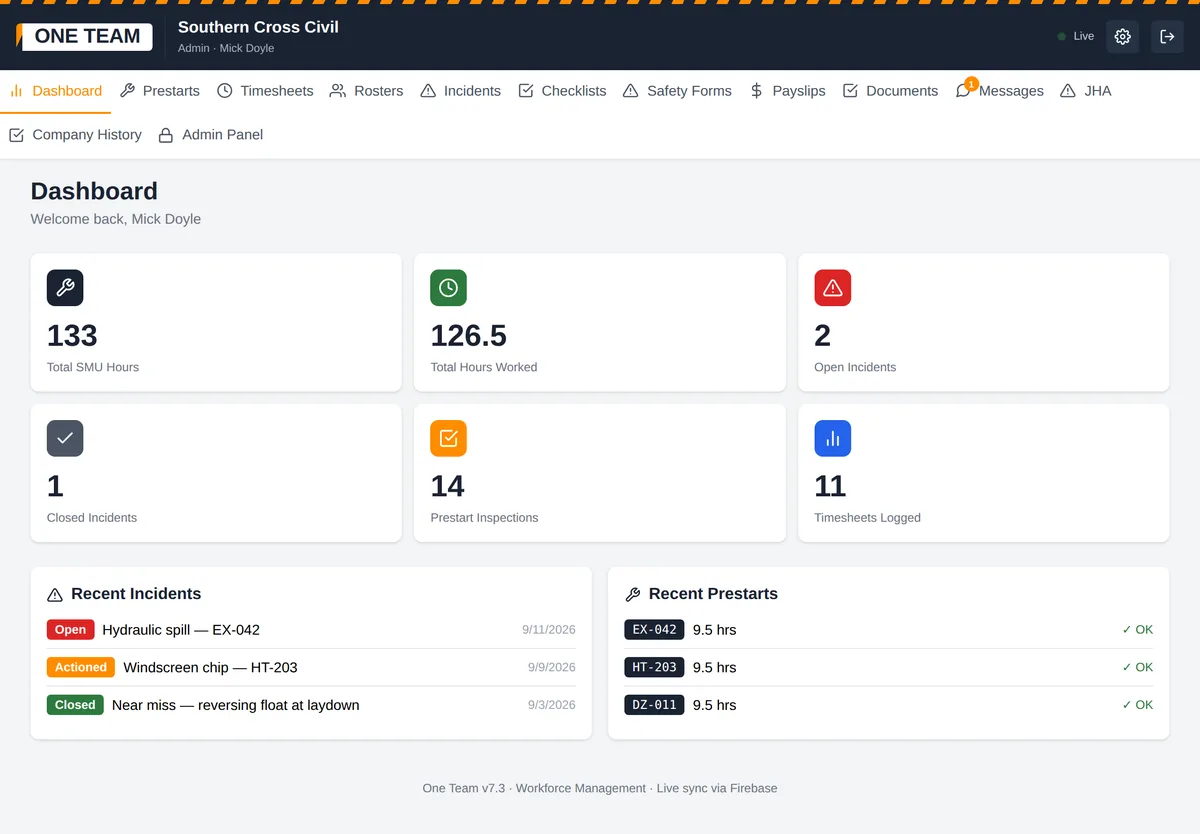
Total SMU hours, hours worked, open incidents, prestarts and timesheets logged, and the latest records underneath. An operator sees their own shift; supervisors, managers and safety see the whole crew's.

Everyone
The Dashboard screen in One Team

03 / 14

Prestarts

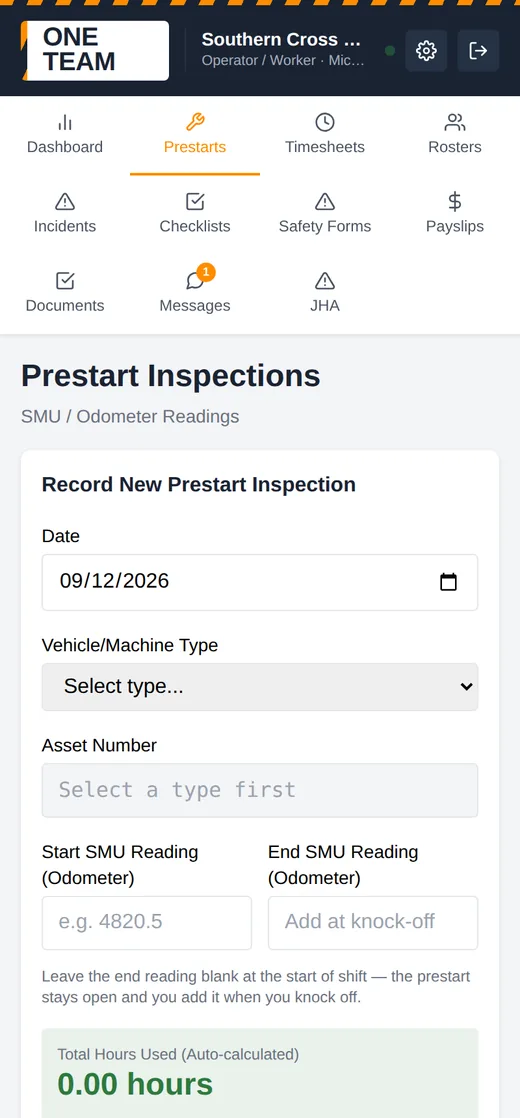
Light vehicle or heavy machine

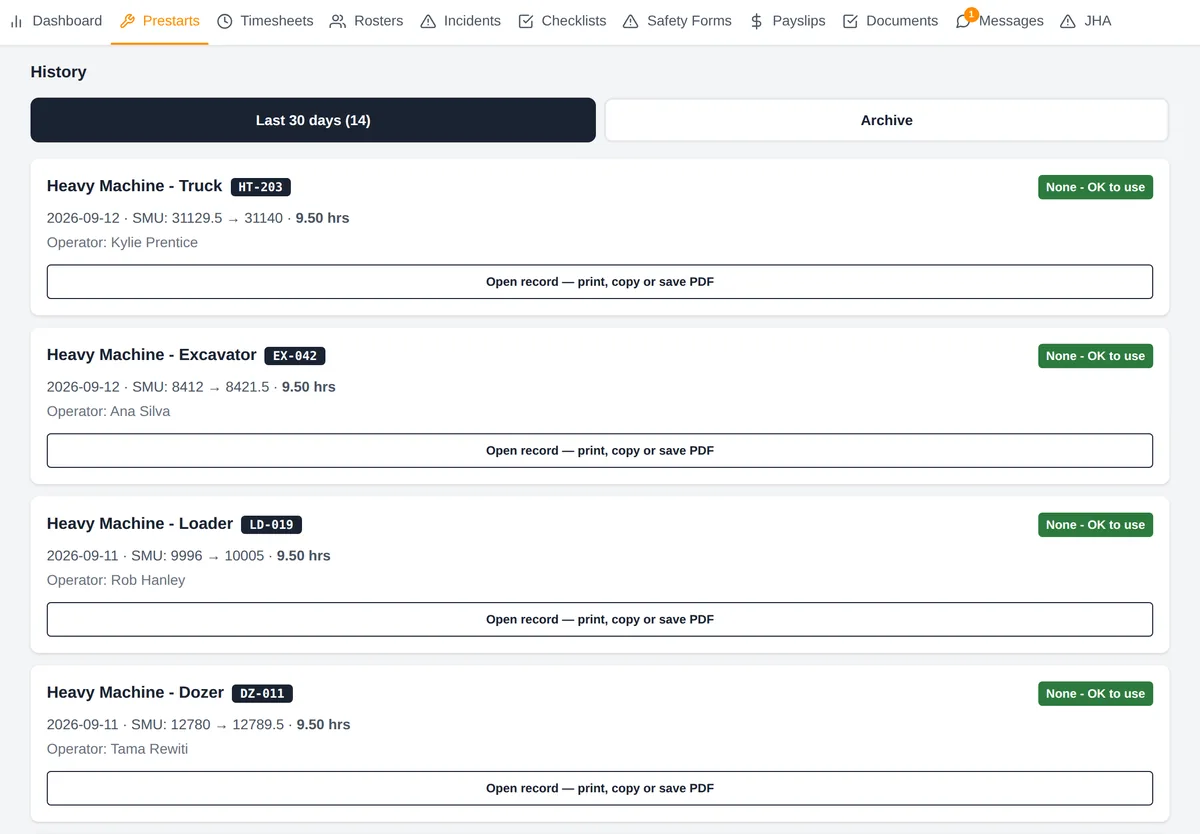
Pick the machine, tap down the checklist, start SMU in at the gate and end SMU at knock-off — hours worked out for you. Photograph any defect. Every record opens as a one-page printable sheet, and the asset number is on every line.

Operators, supervisors, workshop
The Prestarts screen in One Team

04 / 14

Timesheets

Start, finish, break, done

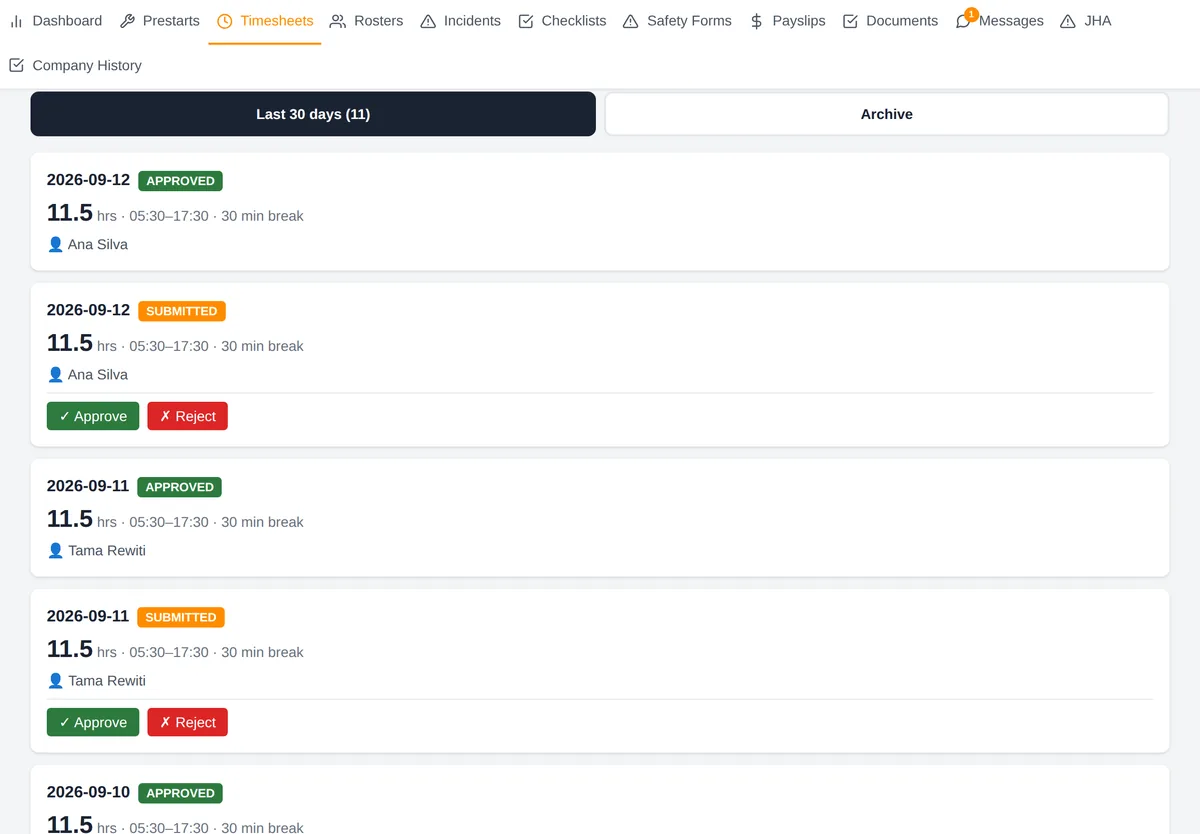
The worker enters their own break in minutes and the hours calculate. Supervisors and managers approve or reject. Payroll can read every one and cannot approve any of them — that separation is enforced by the database, not by a setting.

Operators, supervisors, managers, payroll
The Timesheets screen in One Team

05 / 14

Rosters

Your own spreadsheet, on every phone

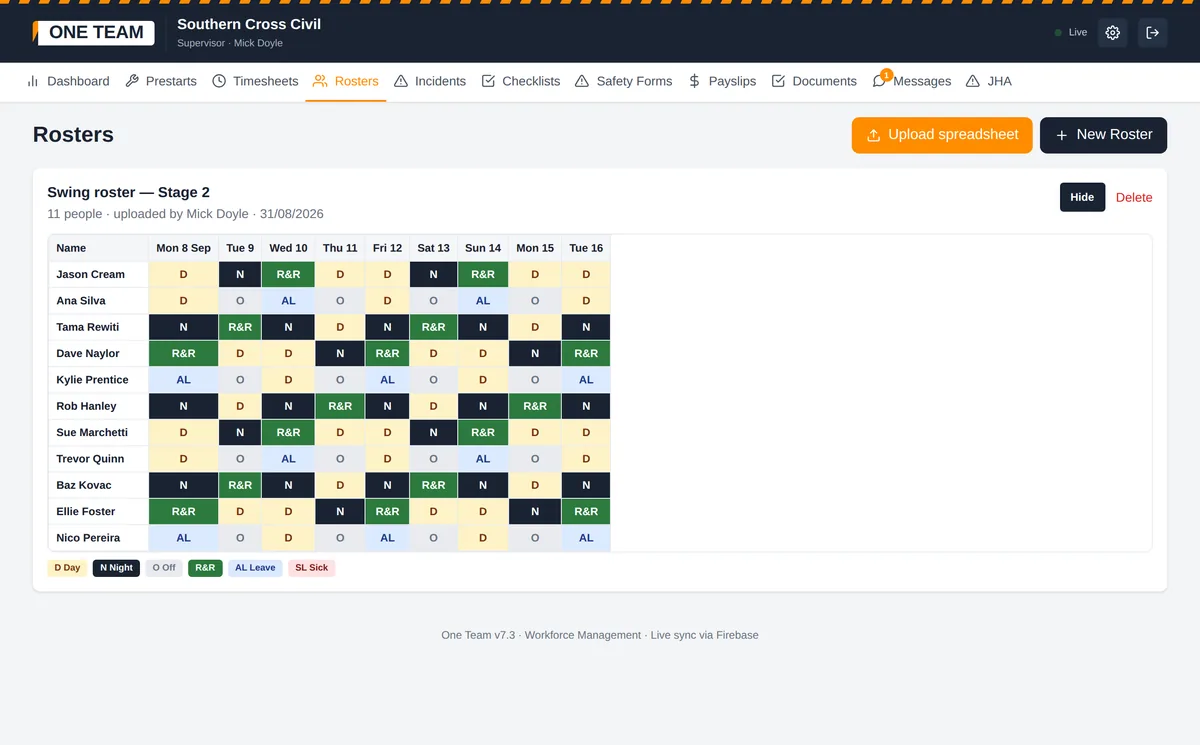
Upload the roster you already keep in Excel or CSV. It comes out colour coded — day, night, off, R&R, annual and sick leave — with names down a sticky left column so the crew can find themselves on a phone.

Everyone; supervisors upload
The Rosters screen in One Team

06 / 14

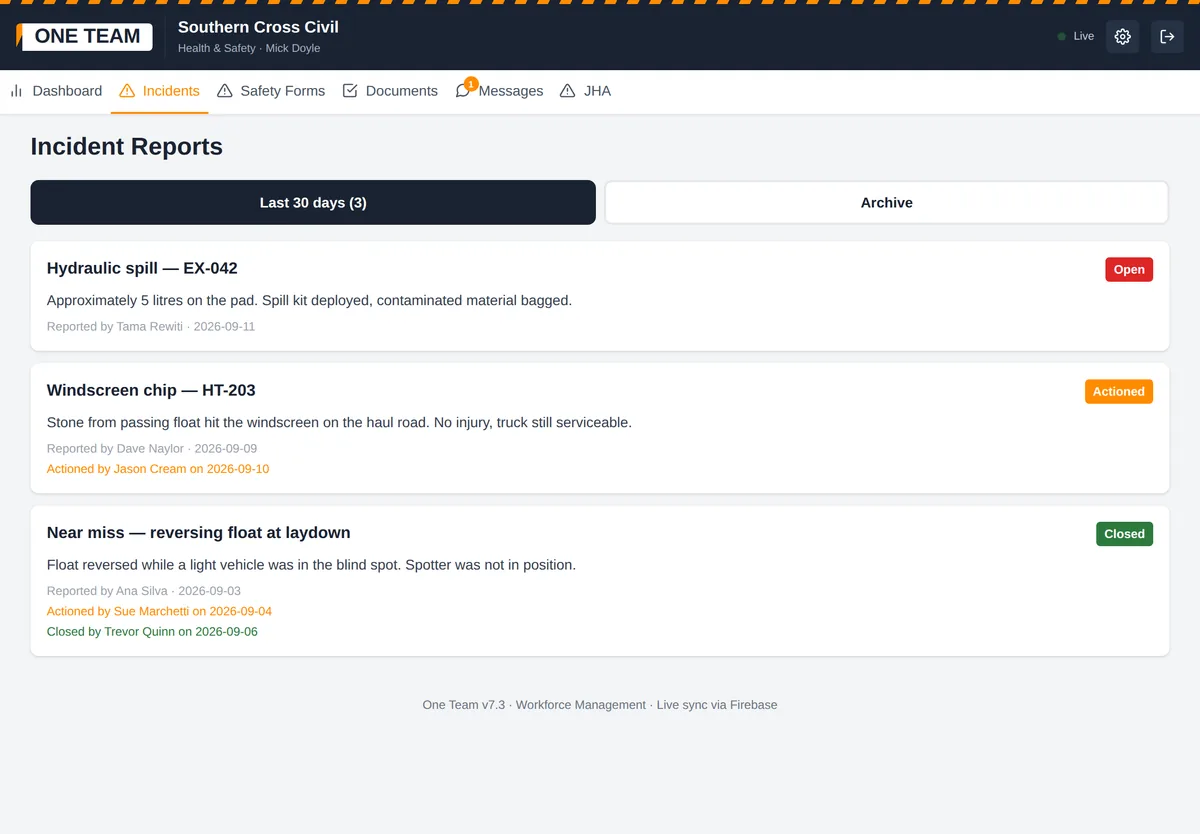
Incident reports

Reported, actioned, closed

Anyone can report one. Photos attach straight from the camera. A timeline records who actioned it and when, and who closed it, so there is no argument later about what happened or who knew.

Everyone reports; supervisors and safety action
The Incident reports screen in One Team

07 / 14

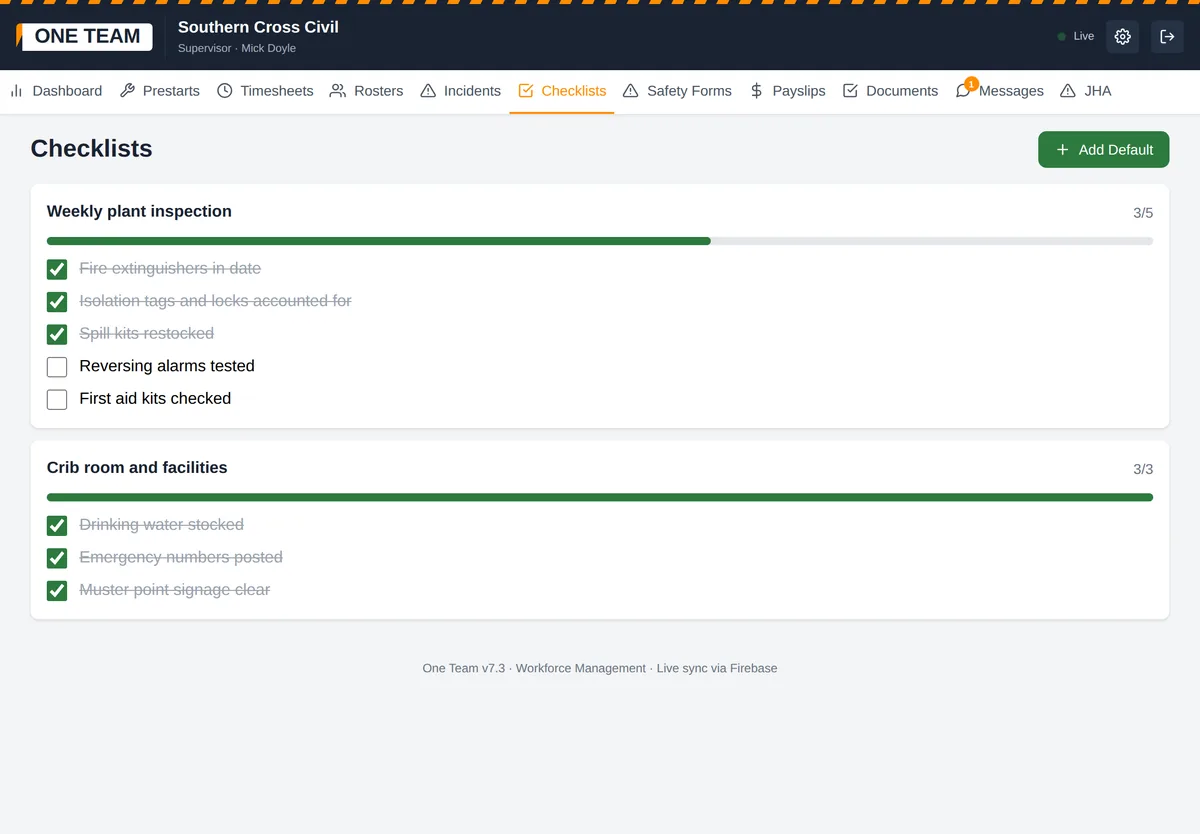
Checklists

Shared lists that tick off live

Weekly plant inspections, crib room checks, whatever you run. Tick an item and it ticks on everyone's phone, with a progress bar so a supervisor can see what is still outstanding without asking.

Everyone
The Checklists screen in One Team

08 / 14

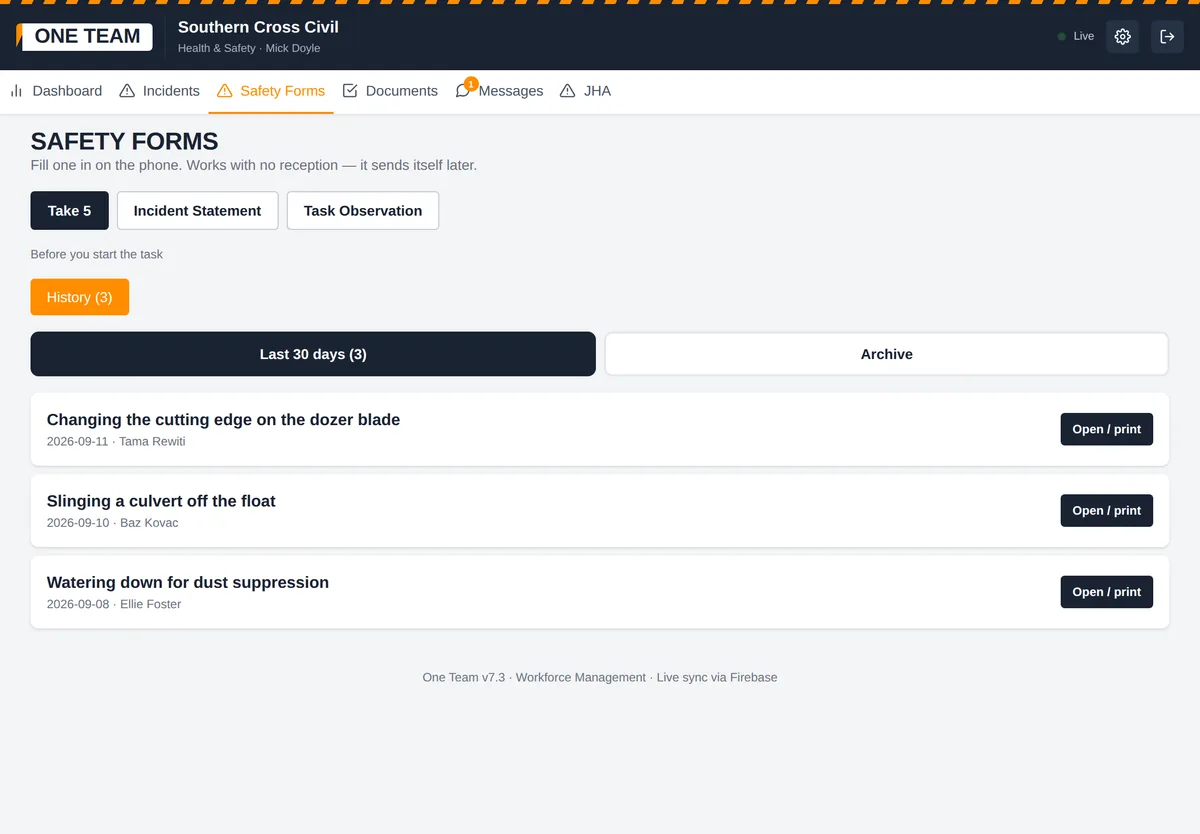
Safety forms

Take 5, statements, task observations

Fill one in on the phone, or open the blank PDF and print it. Task observations record the observer and the operator observed separately, so a supervisor can write up an observation somebody else carried out and the record is honest about both.

Everyone; safety sees all
The Safety forms screen in One Team

09 / 14

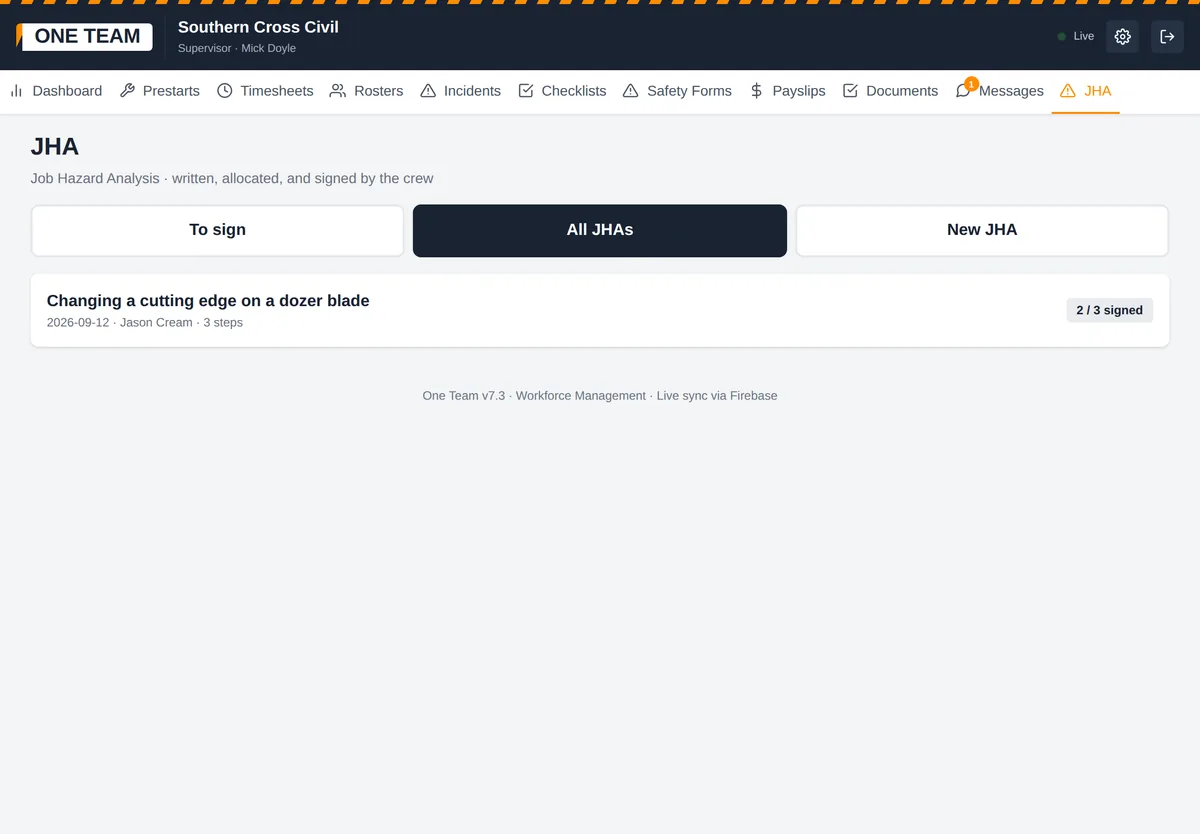
JHA

Built, allocated, signed, locked

A supervisor writes the job steps, hazards and controls against a five-by-five risk matrix, then allocates it to people by name. Each person reads it and signs with a finger on their own phone. Once the first signature lands the JHA is frozen — nobody can quietly edit what was signed.

Supervisors and above build; everyone signs
The JHA screen in One Team

10 / 14

Messages

A crew channel and private messages

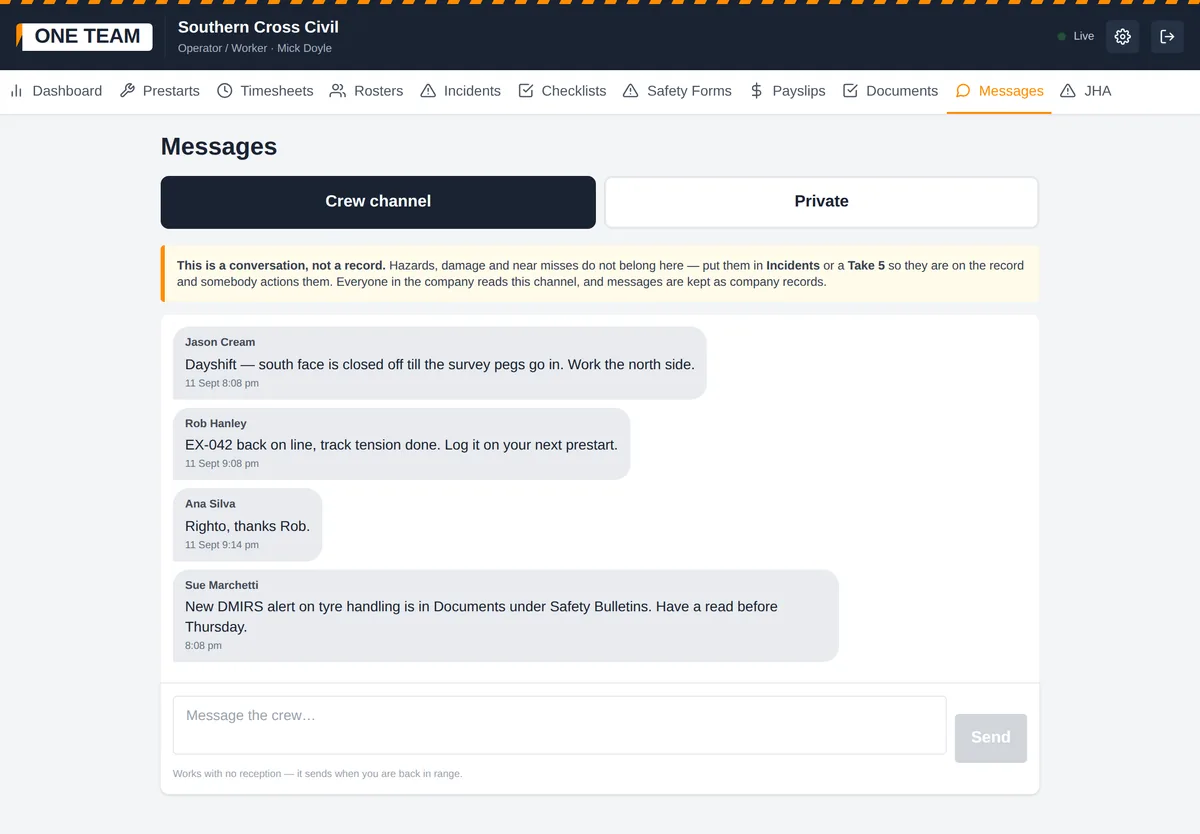
One channel for the whole company plus one-to-one messages. Deliberately not the place for hazards — the screen says so — because a hazard belongs in an incident or a Take 5 where it becomes a record.

Everyone
The Messages screen in One Team

11 / 14

Documents

Policies, procedures, safety bulletins

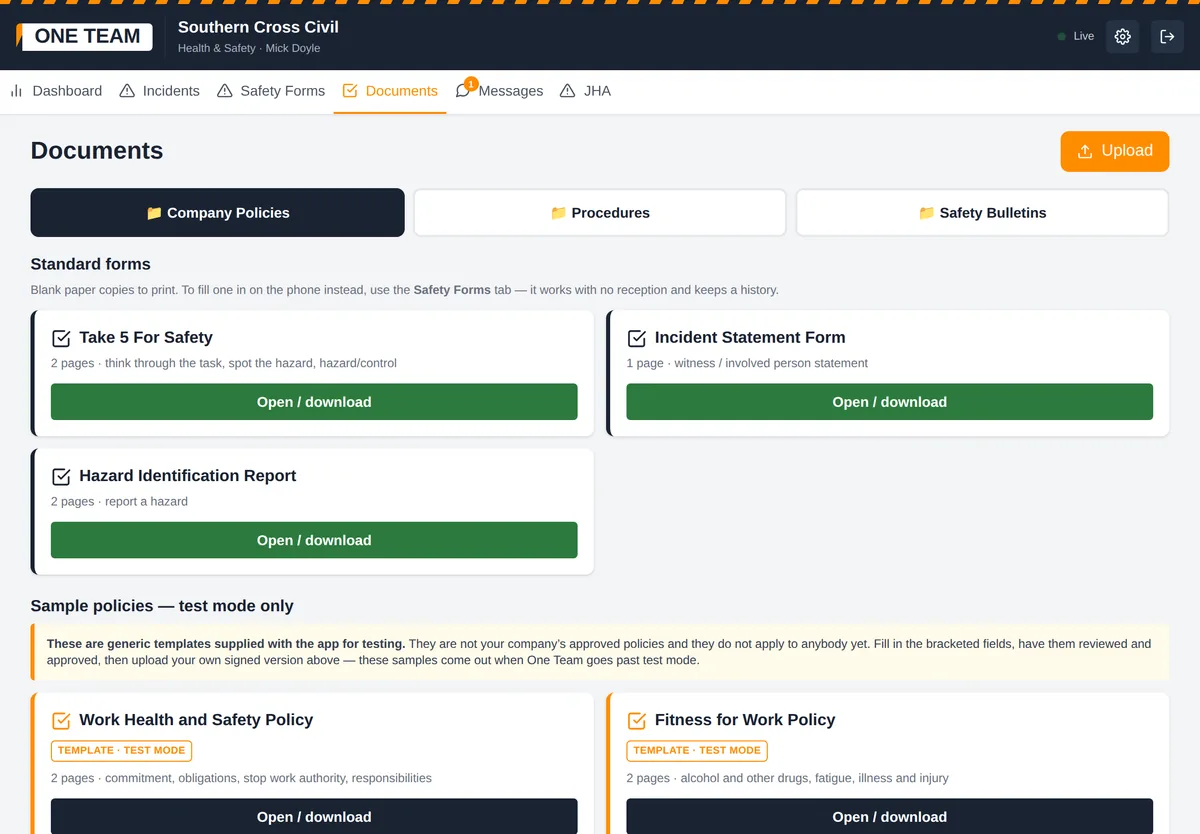
Three folders. Safety can post WorkSafe mine safety alerts and industry bulletins without being able to touch your approved policies. Blank Take 5, statement and hazard report forms ship with the app, so a crew has something to print on day one.

Everyone reads; admin and safety upload
The Documents screen in One Team

12 / 14

Payslips

Private by default

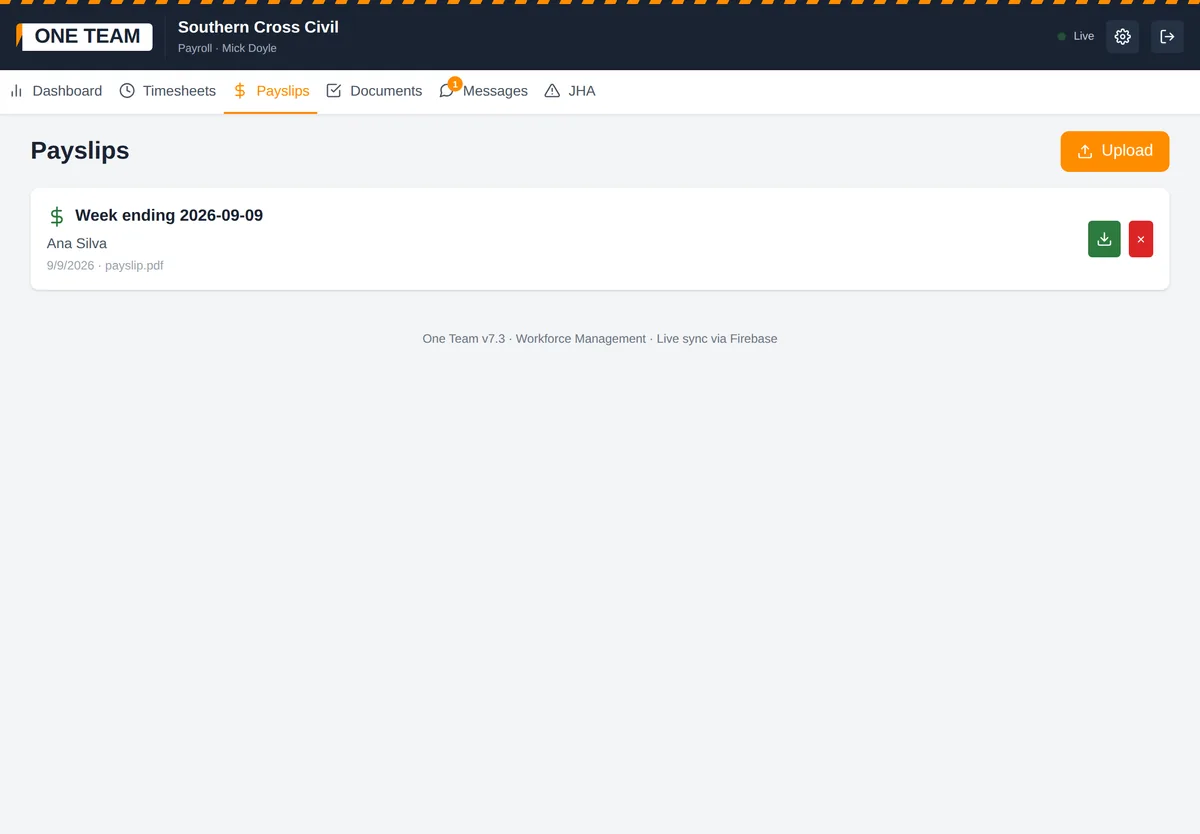
Payroll uploads a payslip against a named worker. That worker can see theirs and nobody else's — and again that is the database refusing, not the screen hiding it.

Admin and payroll upload; each worker sees only their own
The Payslips screen in One Team

13 / 14

Company history

Who has submitted what

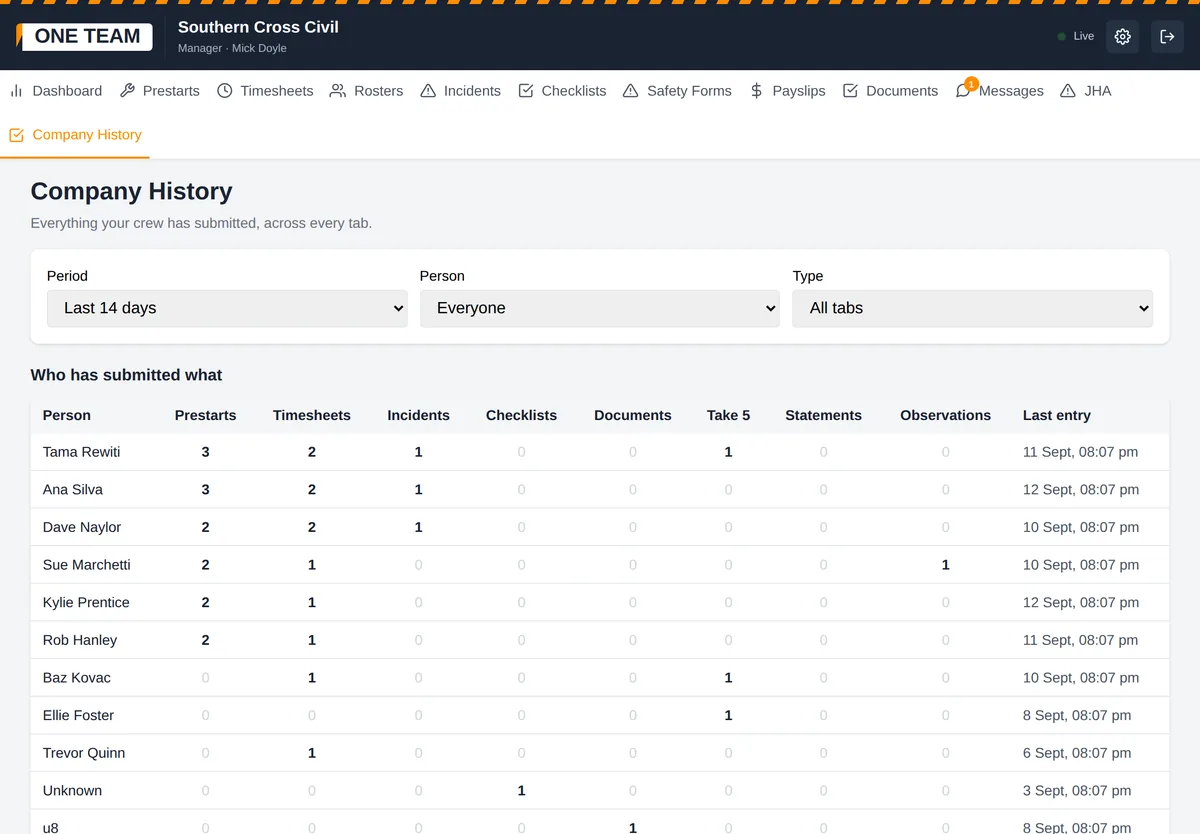
One table across every tab and every person for a chosen period. The fastest way to spot the bloke who has not filled anything in for a fortnight, before it becomes a problem.

Managers and admin, on a desktop
The Company history screen in One Team

14 / 14

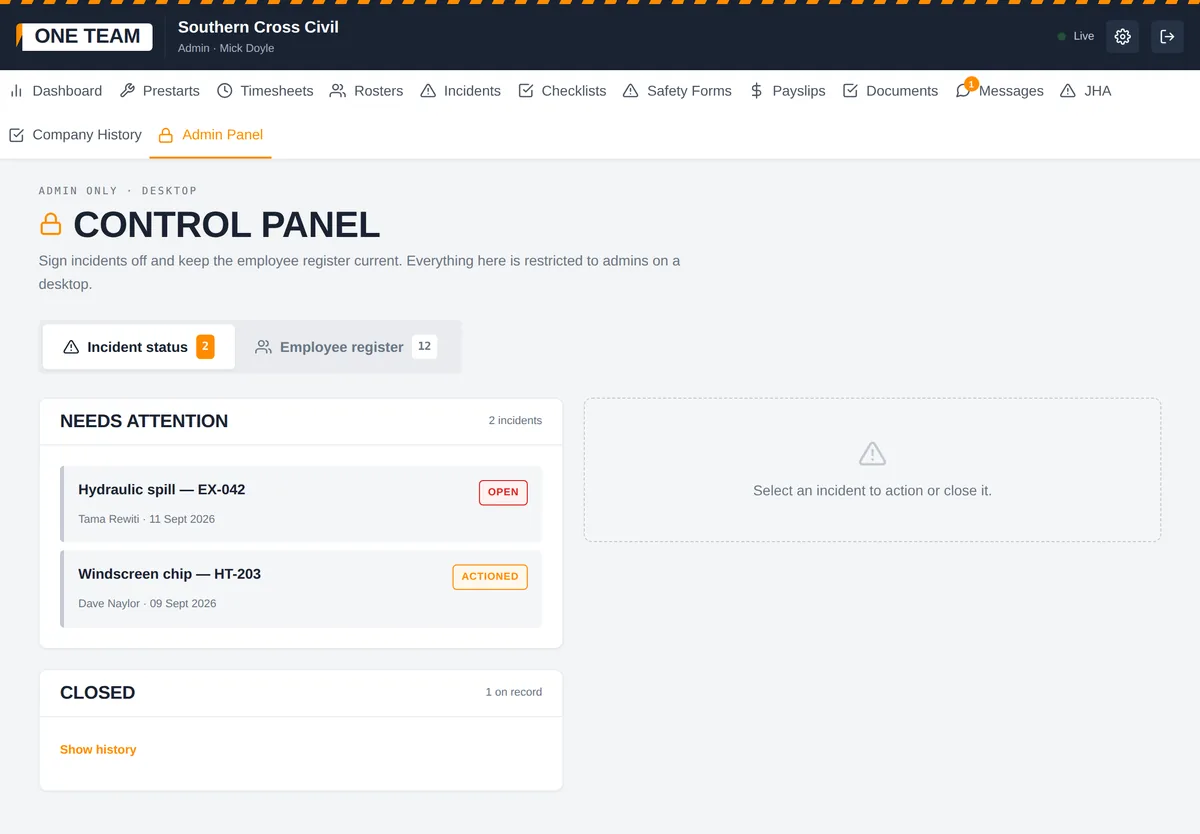
Admin panel

Incidents and the employee register

A queue of incidents needing attention with a sticky detail panel, and the employee register with roles, phone numbers and a remove button for anyone who leaves. Desktop only on purpose — this is not work for a phone at the gate.

Admin only, on a desktop
The Admin panel screen in One Team

Who sees what

Seven roles. A join code decides which one a person lands in, and the database enforces it — a worker cannot reach the crew's pay by poking at the app.

Operator / Worker

Their own prestarts, timesheets, Take 5s and incidents. Sees only their own records.

Supervisor

Everything an operator can do, plus the whole crew's records, task observations, building JHAs, uploading rosters and actioning incidents.

Manager

Sees everything including company history, and approves timesheets. Cannot issue join codes, upload payslips or change company settings.

Health & Safety

Take 5s, statements, task observations and every incident across the crew, plus posting safety bulletins. No hours, no pay.

Workshop

Daily prestart records, defects and damage photos. Read and print only — no hours, no pay, no people.

Payroll

Timesheets and payslips. Reads hours and uploads payslips; approving stays with the manager.

Admin

Everything, and the only role that can issue join codes, change company settings or remove people.
The bit that matters underground

No reception? Fill it in anyway.

The record saves on the phone and sends itself the moment you are back in range. Nobody has to remember. Nobody does it twice.

Down a pit, behind a waste dump, out on a grid line — the prestart still gets done, and it still arrives.

One price, whole company

Not per head. Add the whole crew and it does not move.

$99 AUD every 4 weeks
flat, any crew size
  • Your first 4 weeks free — no card, no payment details
  • Every feature on this page included
  • Invoice quoting our ABN, or pay by card
  • No lock-in contract

What per-seat apps cost the same crew

Crew sizeOne TeamPer-seat app
10 people$99$222
20 people$99$443
30 people$99$665

Per 4 weeks, AUD, rounded. Competitor figures are indicative, taken from published per-user pricing at roughly $24 a user per month, converted to 4 weeks, and will vary by plan and currency. Check their current pricing yourself before you compare.

For mining contractors

When the site audits you

Your paperwork is your licence to be on site — and your shot at the next contract.

Under the WA mines regulations a mine operator has to run a safety management system that its contractors fit inside. WorkSafe's own guide for operators says they must have arrangements for monitoring and evaluating a contractor's compliance, and a system for auditing those arrangements. It also says the operator must not let a contractor start work if their health and safety management plan is not approved.

A crew who can produce signed prestarts, JHAs, Take 5s and an incident record on demand is an easy crew to keep on. A crew with a shoebox of paper is a risk somebody has to manage.

General information, not legal advice. Check your own obligations and your client's requirements.

Simple on purpose

Designed for a bloke in gloves at 4am, not an office.

Four tapsA prestart is pick the machine, tap the list, SMU in, submit.
A photo instead of a paragraphSnap the defect. No spelling required.
Wipe a box cleanTyped the wrong thing? Tap the × and start that box again.
Big buttons, plain wordsNo menus buried in menus. Yes, no, or leave it blank.

Straight answers

The questions a careful buyer asks, answered before you ask them.

Who hosts it, and can we get our records out?
Google Firebase — Google's own infrastructure, with the security that sits behind it. You can export every record to a file yourself, any time, from Settings. Exactly where your data is stored is set out in the privacy policy you accept when you register.
Can another company see our records?
No. Every company is separated by database rules that are tested, not assumed. Workers see their own records; supervisors, managers and safety see the crew's; payslips are visible only to the person they belong to, plus admin and payroll.
Who runs it?
One person — Christopher Oneroa, twenty years in mining and civil, trading as Vision Partners 01. Support is email, and honest about turnaround when I am on a swing.
What happens to our records if we leave?
Export the lot as a file from Settings, any time, without asking anyone. Removing a worker never removes their records — you have to keep those.
Is it locked in?
No contract and no minimum term. Stop paying and nothing is deleted or held to ransom.

Getting started

  1. Register your company. One person does this — name, logo, done. You get a six-character code.
  2. Send the crew the code. They open the site on their phone, add it to the home screen, and join. Nothing to install, no app store.
  3. Do one real prestart together. Ten minutes at smoko and the crew has it.

Rather see it first? Chris will walk you through one prestart, start to finish, on the phone or on site. Or ask a question by email.